Module Reference · EQ & Dynamics
FLAGSHIPA new kind of compressor — The Golden-Ratio Series
Fibonacci Dynamics
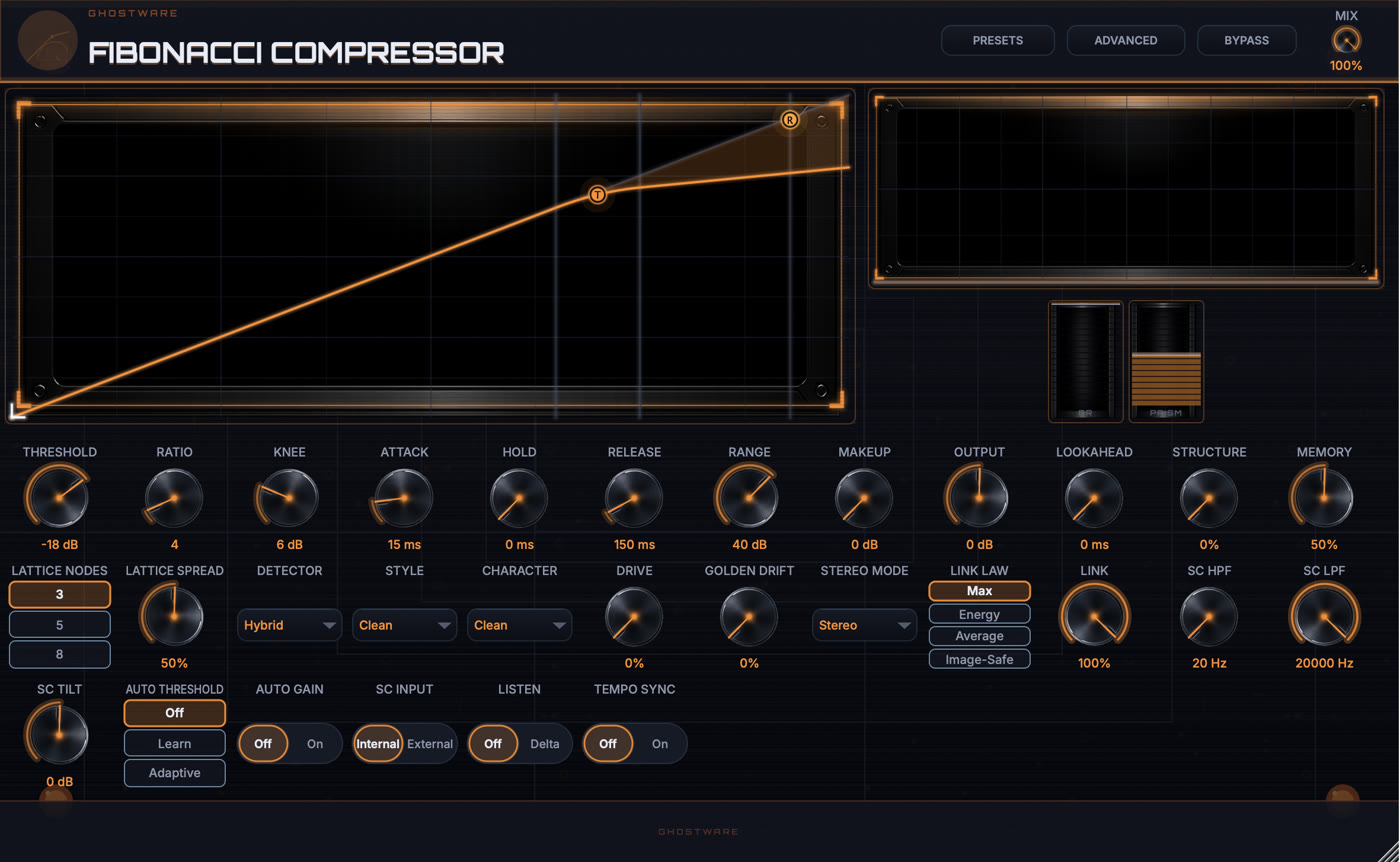
Fibonacci Dynamics starts as a full-featured, transparent compressor - threshold, ratio, knee, attack, hold, release, range, makeup and output, with per-sample gain smoothing and up to 10 ms of lookahead - and then opens a second dimension. Turn up Structure and the single hard knee blooms into a lattice of phi-scaled soft knees: instead of one bend in the transfer curve, gain reduction is distributed across a series of golden-ratio-spaced nodes, so the compression eases in the way natural resonances stack rather than clamping at one point. Lattice Nodes chooses 3, 5 or 8 rungs (Fibonacci numbers) and Lattice Spread sets how far they fan out. At Structure 0 the whole golden-ratio system is bypassed and the module is bit-exact identical to a conventional compressor.
The detector offers Peak, RMS, Energy, Crest and a Hybrid that blends them, and Memory lets the envelope react to recent level history for a breathing, program-dependent character. Auto Threshold can learn a level or adapt continuously, and Auto Gain keeps output matched as you push it. Seven Styles (Clean, Phi Adaptive, Glue, Punch, Level, Vari, Lift) re-voice the timing and knee; Character adds Warm, Diode, Bright or Soft-Clip color with its own Drive, and Golden Drift adds slow phi-timed movement. A full sidechain path - HPF, LPF and tilt, internal or external key - four stereo modes and four link laws (including Image-Safe) round it out, with a delta Listen solo and optional tempo sync.
Why it hits different
The GhostWare take.
- A phi-scaled soft-knee lattice - 3, 5 or 8 golden-ratio nodes spread the gain reduction instead of one hard knee.
- Five detectors plus Memory and Auto Threshold make the envelope react to the actual program.
- Bit-exact conventional compressor at Structure 0, so the golden-ratio layer is always opt-in.
In the shot
Reading the panel.
-
1
TRANSFER CURVE
The live compression curve with the golden-ratio lattice knees drawn on it - drag the threshold, ratio and knee right on the plot.
-
2
GR + PRISM METER
Live gain reduction alongside the phi-prism meter that shows how the lattice is distributing the work across its nodes.
-
3
DYNAMICS DECK
Threshold, ratio, knee and timing up front; Structure, Memory, lattice, detector, style, character, drive and sidechain behind them.
Control Showcase
Every control, explained.
31 controls, named exactly as they appear in the plugin.
The level where compression begins. Signal above it gets reduced; below it passes untouched.
How hard the signal is compressed once it crosses the threshold. Higher ratios clamp peaks more firmly.
How gradually compression eases in around the threshold. A wider knee is smoother and more transparent.
How fast the compressor grabs a signal once it crosses the threshold. Faster catches transients; slower lets them through.
Keeps the gain reduction engaged for a set time after the signal drops, before release begins.
How fast the compressor lets go after the signal falls back below the threshold.
Caps the maximum gain reduction, so the compressor can only ever pull the level down so far.
Adds fixed gain to bring the compressed signal back up to match the input level.
Final output trim after everything else, for level-matched A/B or gain staging.
Balance between the compressed and dry signal - lower values give parallel (New York) compression.
Delays the audio slightly so the compressor can react to a peak before it arrives. Adds latency while nonzero.
The golden-ratio dimension: at 0 the module is a bit-exact conventional compressor; turning it up blooms the single knee into a phi-scaled lattice of soft knees.
How much the envelope reacts to recent level history, for a breathing, program-dependent character.
How many golden-ratio rungs the lattice uses - 3, 5 or 8 (Fibonacci numbers) - across which the gain reduction is distributed.
How far the lattice nodes fan out from the threshold. Wider spreads the compression across a bigger level range.
What the compressor listens to: Peak catches transients, RMS follows loudness, Energy and Crest weight the dynamics differently, and Hybrid blends them.
Voicing presets that re-shape the timing and knee: Clean, Phi Adaptive, Glue, Punch, Level, Vari and Lift.
Adds analog color to the gain stage: Warm, Diode, Bright or Soft-Clip. Clean stays transparent.
How hard the Character color is pushed. At 0 there is no added coloration.
Adds slow, phi-timed movement to the timing for a living, less static character.
How the channels are processed: full Stereo, independent Dual-Mono, Mid/Side, or only the Mid or Side.
How the two channels share one gain decision: Max, Energy, Average, or Image-Safe (protects the stereo image).
How tightly both channels track one reduction decision. 100% keeps the stereo image stable.
High-pass on the detector only, so bass energy stops triggering the compressor without changing the sound.
Low-pass on the detector only, so high-frequency energy is de-emphasized in the trigger.
Tilts the detector spectrum brighter or darker, biasing what the compressor reacts to.
Learn measures a level and sets the threshold once; Adaptive keeps adjusting it continuously to the program.
Automatically matches output to input level as you change the compression, for honest A/B.
Whether the detector listens to the signal itself (Internal) or an external sidechain key (External).
Delta solos just the difference the compressor is making, so you can hear exactly what it removes.
Locks the phi-timed movement and timing to the host tempo instead of free-running.