Module Reference · EQ & Dynamics
FLAGSHIPA new kind of EQ — The Golden-Ratio Series
Phi Spectral EQ
Phi Spectral EQ is the rack's most advanced tone tool: an STFT engine that splits the signal into up to 128 perceptual bands and rides every one of them in real time. In Auto mode it finds the resonances - the harsh peaks and honky build-ups the ear hates - and ducks only those, only when they spike, leaving everything else untouched. In Region mode you point it at a frequency range with the Region Low / High controls and let it police just that zone.
It is built to stay musical. A masking model (Tonal Guard, Mask Blend) only cuts what you can actually hear, Transient Guard and Sustain Bias keep drum hits intact while it tames sustained tones, and per-band Attack, Release, Knee and Slew shape how the reduction moves. Upward mode gently lifts buried detail instead of only cutting; a Learn mode profiles your material over a few seconds; Mid-Side, Left-Right and Transient-Sustain channel modes plus a Delta listen make it a genuine mastering tool. Three phase modes trade zero latency for perfectly time-aligned linear-phase precision.
Why it hits different
The GhostWare take.
- Auto resonance detection across up to 128 perceptual bands - it finds the problem for you.
- A psychoacoustic masking model cuts only what you can actually hear, so it stays invisible.
- Upward lift, a Learn mode and Mid-Side / linear-phase processing take it to mastering grade.
In the shot
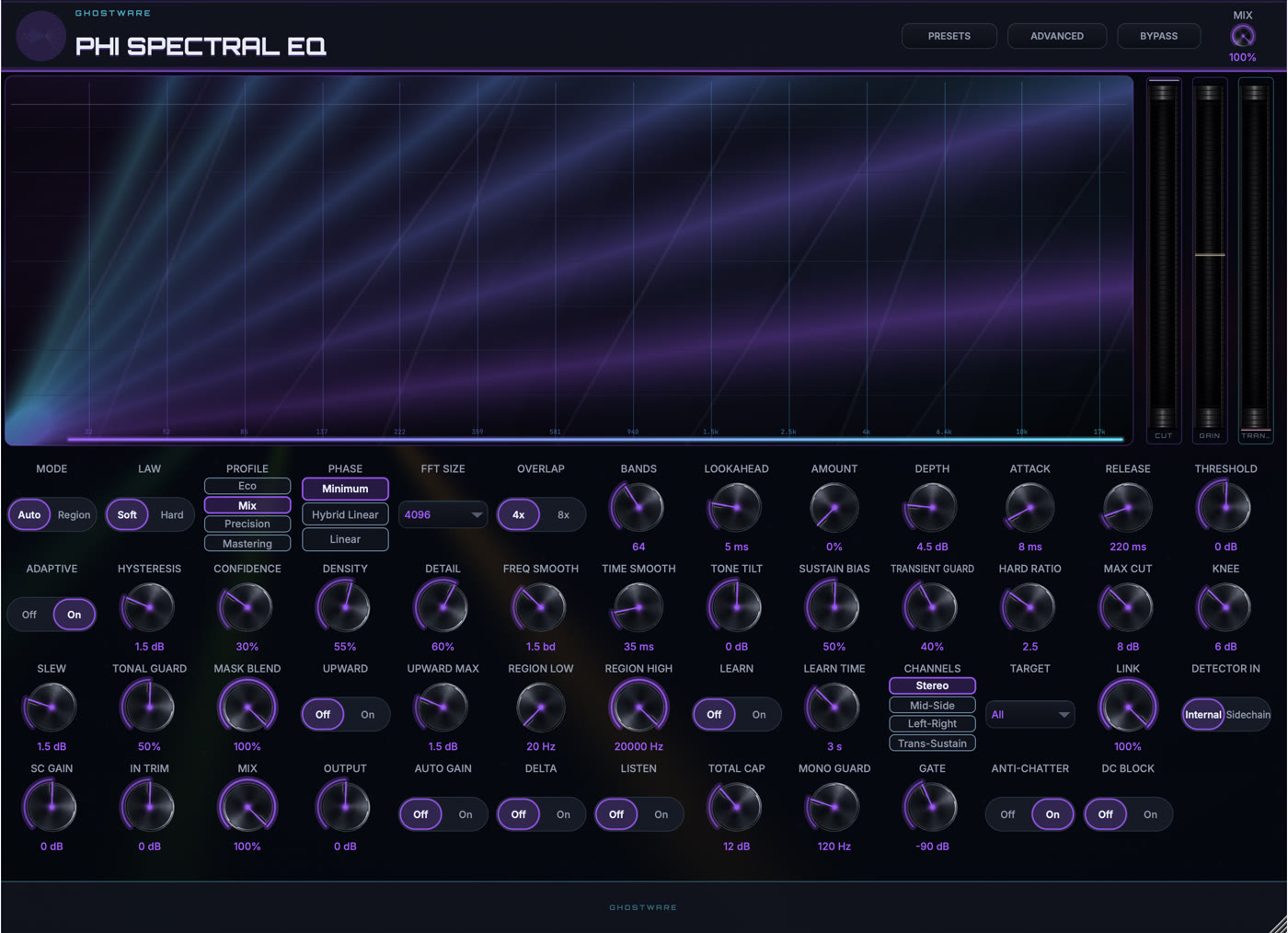
Reading the panel.
-
1
SPECTRAL ANALYZER
Live spectrum with the resonance curve the engine is riding in real time.
-
2
CUT / GAIN METERS
CUT, GAIN and TRANS meters show how hard each stage is working.
-
3
SPECTRAL DECK
Mode, law, profile and phase up top, then the full grid of taming, masking, upward and learn controls.
Control Showcase
Every control, explained.
51 controls, named exactly as they appear in the plugin.
Auto hunts resonances across the whole spectrum automatically; Region confines the processing to the band you set with Region Low and Region High.
Soft eases into each cut for transparency; Hard clamps resonances harder using the Hard Ratio for aggressive taming.
Quality presets trading CPU for accuracy: Eco is lightest, Mix is the everyday setting, Precision and Mastering add resolution for critical work.
Minimum is zero-latency and instant; Linear keeps every frequency perfectly time-aligned for mastering (adds delay); Hybrid Linear sits in between.
Size of the spectral analysis window. Larger sizes resolve low frequencies more finely but react a little slower.
How much the analysis windows overlap. 8x is smoother and cleaner than 4x at a little more CPU.
How many perceptual bands the spectrum is divided into. More bands mean finer, more surgical resonance control.
Lets the detector see slightly ahead so it catches resonances the instant they start (adds that much latency).
Master intensity of the whole effect. 0% is a transparent pass-through; turn it up to apply more taming.
The maximum reduction any single band is allowed to apply to a resonance.
How fast a band clamps down once a resonance appears.
How fast a band lets go again after the resonance passes.
Shifts the detector sensitivity: lower catches more subtle resonances, higher only the worst offenders.
Lets the detector continuously re-learn the material so its sensitivity tracks the mix instead of sitting fixed.
Gap between where a band starts and stops acting, so it never chatters on borderline resonances.
How sure the detector must be before it acts - higher ignores anything but clear, sustained resonances.
How many bands may act at once - low is surgical (a few peaks), high spreads the smoothing across the spectrum.
Resolution of the correction curve: higher follows the spectrum more tightly, lower stays broad and gentle.
Smooths the correction across neighbouring frequencies (in bands), so cuts blend instead of forming narrow notches.
Smooths the correction over time, so the processing glides rather than flickers.
Tilts the overall result darker (negative) or brighter (positive) after the taming.
Biases the processing toward sustained tones and away from short hits - higher leaves transients more alone.
Protects transients, so drum hits and consonants stay sharp while sustained resonances are tamed.
How hard the Hard law clamps a resonance once it crosses threshold - higher is more aggressive.
A hard ceiling on how many dB any single band may be cut, no matter how loud the resonance.
Softens the onset of each band's action. 0 is an abrupt corner, higher is a gradual, gentle transition.
Limits how fast a band's gain can change per step, keeping fast corrections smooth and artifact-free.
Protects tonal (pitched) content from over-processing, so the harmonic core of a sound survives.
How much the psychoacoustic masking model is used: at 100% the module only cuts what is actually audible, ignoring masked energy.
Turns on upward processing, letting bands gently lift buried detail as well as cut resonances.
Ceiling on how many dB the upward stage is allowed to add.
Low edge of the frequency zone processed in Region mode.
High edge of the frequency zone processed in Region mode.
Analyses the incoming material to build a reference spectral profile the processing works against.
How long the Learn stage listens before locking in its profile.
How the stereo signal is split for processing: Stereo, Mid-Side (centre vs width), Left-Right, or Transient-Sustain (hits vs tails).
Which component the processing is applied to: everything, or just the Mid, Side, Left, Right, Transients or Sustain.
How tightly the channels are processed together. 100% acts identically on both; lower lets each channel react on its own.
What the detector listens to: the signal itself (Internal) or the plugin's external sidechain input.
Level trim for the sidechain signal feeding the detector.
Input level trim applied before processing.
Blend between the untouched signal and the processed one. 100% is fully wet.
Final output level trim, for matching loudness when you compare.
Automatically compensates the output level for the processing so you can A/B at equal loudness.
Plays only what the module is removing (or adding), so you can hear exactly what it is doing.
Solos the detector's view of the signal so you can hear what it is reacting to.
A global limit on the total gain reduction across all bands combined.
Keeps everything below this frequency processed in mono, so the low end stays solid and centred.
Below this input level the processing stops, so it never chases the noise floor during silence.
Extra smoothing that stops bands rapidly switching on and off on borderline material.
Removes any silent waveform offset (DC) that would otherwise waste headroom.